Time and Sync
View sourceWhat you’ll learn: how a graph decides when each Flow runs (clocks) and which upstream record it consumes (sync policies) — the two knobs that let cameras, controllers, and slow policies coexist without a shared timestep.
Robots do not run on one global step. Cameras stream, controllers run fast, planners block, policies have variable latency, operators intervene at irregular times. Retriever makes that explicit with two independent decisions per Flow:
| Decision | Made by | Question it answers |
|---|---|---|
| Clock | @ Rate(...), @ Trigger(...), @ Hybrid(...) |
When does this Flow wake up? |
| Sync policy | sync= on each incoming edge |
Which buffered record becomes its input? |
Clocks decide when
Section titled “Clocks decide when”A Flow fires at its own clock times. There is no shared k that means “the next step” for every Flow.
Rate(hz=30)— periodic; fire every1/30 s.Trigger("image")— event-driven; fire when theimagefield arrives on an incoming edge.Hybrid(hz=10, "replan")— periodic and event-driven; fire on the timer or immediately on the named field.
The camera source wakes periodically; the detector wakes when a frame arrives; the display wakes at its own slower rate. The .then(..., sync=...) calls are the reactive graph edges: upstream event history flows forward, and the sync policy decides which record is visible when the downstream Flow wakes. Run it:
What happens at a firing time
Section titled “What happens at a firing time”When a Flow’s clock fires at time t, the runtime samples each incoming edge’s buffer, assembles one typed input object, and calls the synchronous step(...). The rest of the graph may be sleeping, catching up, or firing on other clocks.
Sync policies decide which record
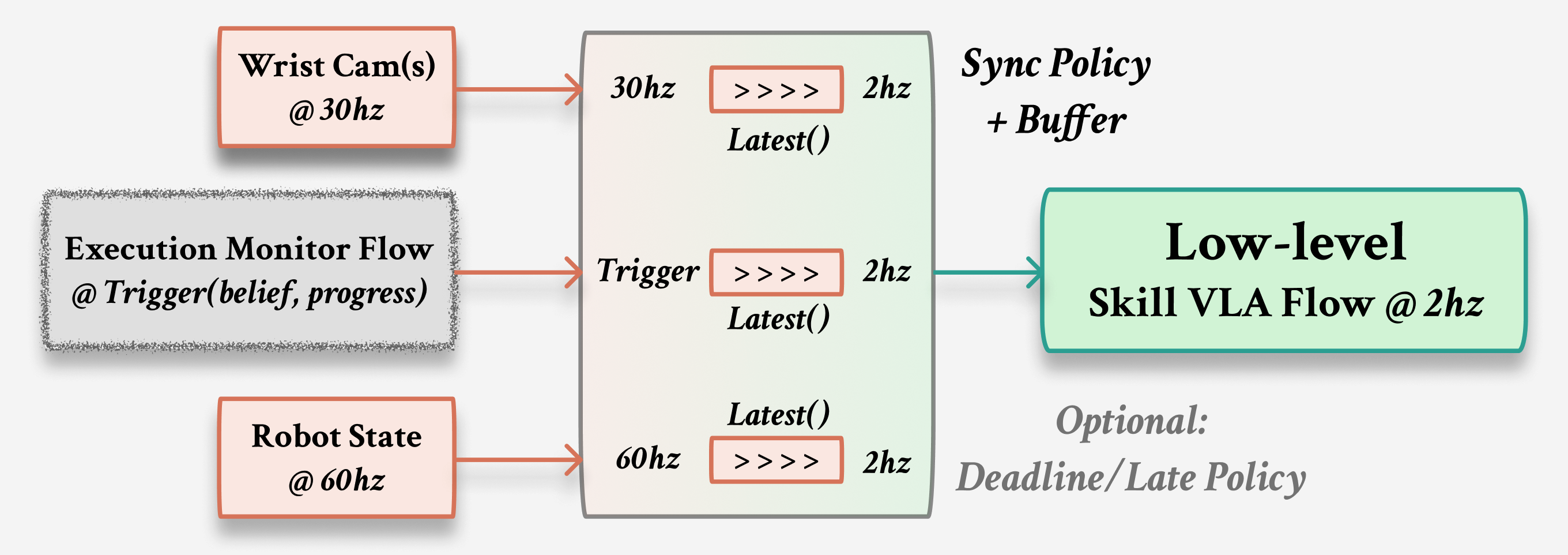
Section titled “Sync policies decide which record”Every edge accumulates a timestamped buffer of upstream outputs. The sync= policy consumes that buffer at firing time t and returns exactly one value for step(...):
| Policy | What it returns |
|---|---|
Latest() |
The most recent value in the buffer. |
Window(buffer_size, duration, agg) |
An aggregate (mean/last/max/min/first) over the last duration seconds. |
Hold(debounce=...) |
Zero-order hold of the last value, optionally rate-limited. |
Events(buffer_size, duration) |
A slice of recent history, for Flows that reason over a stream. |
Latest() is right when one fresh value is enough. Window(...) is right when a slower Flow should see a short history summarized at its own clock time — the classic fast-producer, slow-consumer bridge:
The 30 Hz sensor, 10 Hz smoother, and 1 Hz printer never share a step. The Window on the edge is what turns a fast stream into a value the slow printer can consume — and it does so from the buffered records, not from global state.
Why this is the determinism boundary
Section titled “Why this is the determinism boundary”The clock is where wall-clock nondeterminism lives: exactly which frames land in a window depends on scheduling, so the numbers above shift run to run. A sync policy is a function of the buffered, timestamped records and their defined order. That separation is Retriever’s functional determinism boundary: replay the same ordered input history and every sync samples the same records, so deterministic step() bodies produce the same discrete-event outputs. Live scheduling chooses the history; recording makes that history available to replay and verify.
When timing looks wrong
Section titled “When timing looks wrong”| Symptom | Check first | Why |
|---|---|---|
| A Flow never runs | Its clock — Rate, Trigger fields, or Hybrid. |
A Flow only wakes when its own clock fires. |
| A Flow runs on stale data | The edge sync= and buffer size. |
Input is sampled from buffered history, not magic global state. |
| A slow model blocks progress | Split it into its own Flow with a clock/sync boundary. | Latency should be visible in the graph, not hidden in a callback. |
| A run won’t reproduce | Render the graph, then record/replay inputs. | Debug from explicit clocks, ports, and buffers. |
Next: Runtime connects clocks and sync to validation, in-process stepping, backends, and replay.